

BITC Timecode Transcription: Fix Express Scribe Drift & Export Accurate SMPTE (2026)
BITC (burned-in timecode) transcription breaks when timestamps drift on long 29.97fps files. Learn why Express Scribe-style errors happen, before/after workflow times, and how VideoText.io computes SMPTE deterministically.
Tags: BITC, SMPTE, Timecode, Transcription, Express Scribe
BITC transcription (burned-in timecode) is non-negotiable for broadcast, legal, and post-production deliverables — every speaker tag must reference the on-screen SMPTE clock, not wall-clock guesswork. When timestamps drift an hour into a file, QA becomes archaeology.
BITC-accurate AI transcripts: Video → Transcript → — enable SMPTE/BITC mode, set anchor + frame rate, export TXT/DOCX with deterministic timecodes. Express Scribe alternative →
What BITC means in transcription
BITC = Burned-In Time Code — the timecode visually embedded in the video frame (often top-left), formatted as:
Non-drop:
HH:MM:SS:FF(colons before frames)Drop-frame (29.97 / 59.94 fps):
HH:MM:SS;FF(semicolon before frames)
Transcriptionists reference BITC so editors can reconcile script to picture without re-spotting audio. Client specs often require:
Speaker 1 (01:14:22:15)
Text of utterance...
If your tool outputs 01:14:24:02 when the burned-in clock shows 01:14:22:15, the deliverable fails QA — even when every word is correct.
The Express Scribe drift problem (real failure mode)
Professional transcriptionists report a specific failure on long NTSC masters:
At 00:45:00, BITC tags align with the burned-in clock
At 05:00:00+, tags drift 1–3 seconds ahead or behind
Example: burned-in shows
19:59:34:16, tool outputs19:59:36:10(~1.9s error)
Root causes (documented in SMPTE engineering):
Floating-point second accumulation — adding
7.3srepeatedly instead of integer frame countsDrop-frame math skipped — treating 29.97fps as 30fps nominal (drifts ~3.6s/hour)
Re-deriving timecode from chunk offsets instead of anchor + elapsed frames once
VideoText.io built deterministic SMPTE arithmetic specifically to eliminate this class of bug — integer frame counts from a single anchor, with proper drop-frame encode/decode at 29.97/59.94fps.
Before vs after: 3-hour 29.97fps documentary
Single-camera interview with BITC starting at 00:00:00;00, drop-frame 29.97fps, deliverable requires speaker tags with SMPTE at each turn.
Before (manual + drift-prone tooling)
| Step | Time | Risk |
|---|---|---|
| Pedal through 3-hour file in Express Scribe | 4–6 hours | Typing fatigue |
| Insert SMPTE at speaker changes from on-screen BITC | 45 min | Human mis-read |
| Mid-file drift correction (re-spot audio vs clock) | 30–60 min | Common on hour 2+ |
| Client QA rejection + rework | 45 min | Failed delivery |
| Total | 6–8 hours |
After (VideoText.io SMPTE/BITC mode)
| Step | Time |
|---|---|
Upload 3-hour file; set anchor 00:00:00;00, 29.97 DF |
2 min |
| Whisper large-v3 processing | ~8 min |
| Enable speaker diarization + SMPTE timestamp mode | 1 min |
| Edit proper nouns + 15 mis-hears | 25 min |
| Spot-check BITC at 00:30, 01:30, 02:30, 03:00 marks | 10 min |
| Guideline format export → | 5 min |
| Total | ~51 min |
Time saved: 5–7 hours per long BITC job — plus elimination of drift rework.
Validation: regression tests verify no frame drift across 1500+ offsets spanning 3+ hours at 29.97fps drop-frame.
Pricing: BITC workflows — tool stack vs VideoText.io
BITC jobs historically require Express Scribe + manual typing or expensive human Rev review. VideoText.io collapses that stack.
| Express Scribe + manual | TurboScribe + manual BITC | VideoText.io | |
|---|---|---|---|
| Monthly cost | $40–80 player + your hours | $10/mo + no BITC support | Free → $7.99/mo Pro |
| 3-hour BITC job labor | 6–8 hours typing | N/A (no BITC) | ~51 min QA |
| Rev human (3 hr @ $1.50/min) | $270 per file | — | AI + QA for $7.99/mo |
| Drift rework risk | High on 29.97 DF | N/A | ✅ Integer-frame SMPTE |
| 3-column Speaker·Timecode·Dialogue export | ❌ Manual Word | ❌ | ✅ Built-in |
Most cost-efficient BITC pipeline: upload once → SMPTE/BITC mode → speaker mapping → 3-column DOCX → guideline format → deliver.
Full BITC workflow in VideoText.io (with screenshots)
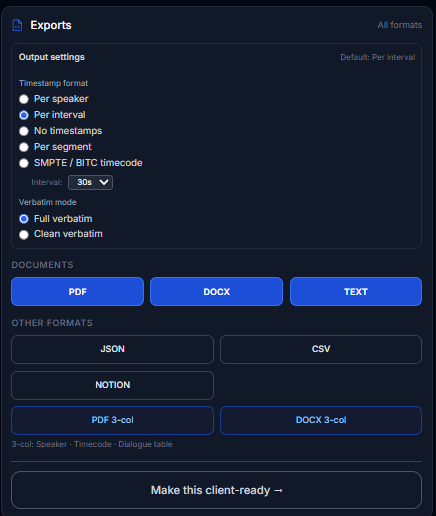
Step 1 — Enable SMPTE / BITC timecode in Exports before processing. Set anchor timecode + frame rate (e.g. 29.97 drop-frame) matching your burned-in clock.
Step 2 — Speaker diarization + mapping. Turn on speaker labels; use "Who said what" to assign names. Each speaker turn gets a BITC-accurate tag — no hand-typing from the on-screen clock.
Step 3 — Export. Choose per-speaker timestamps with SMPTE notation, or 3-column PDF/DOCX (Speaker · Timecode · Dialogue) for broadcast clients.
Step 4 — Share. Send a read-only link for client spot-checks against picture — original or translated.


Drop-frame vs non-drop: why it matters
| Rate | Notation | Real-world use |
|---|---|---|
| 25 fps | HH:MM:SS:FF |
European broadcast |
| 30 fps (true 30) | HH:MM:SS:FF |
Some digital masters |
| 29.97 fps DF | HH:MM:SS;FF |
NTSC, most US broadcast |
| 59.94 fps DF | HH:MM:SS;FF |
High-frame-rate NTSC |
Classic mistake: reading 01:00:00;00 as if it were non-drop 30fps nominal time. At 29.97fps, one real hour = 107,892 frames, not 108,000. Tools that skip drop-frame compensation drift ~3.6 seconds per hour.
VideoText.io decodes the anchor notation (: vs ;), computes in real elapsed frames, re-encodes in the anchor's format — so a drop-frame master round-trips correctly.
BITC workflow comparison
| Capability | Express Scribe | TurboScribe | VideoText.io |
|---|---|---|---|
| BITC / SMPTE speaker tags | ⚠️ Manual insert; drift on long DF files | ❌ | ✅ Deterministic |
| 29.97 drop-frame support | ⚠️ User reports drift | ❌ | ✅ |
| AI draft (Whisper-class) | ⚠️ Add-on | ✅ | ✅ |
| Anchor timecode entry | ✅ Manual | ❌ | ✅ HH:MM:SS:FF fields |
| Speaker diarization | ❌ | ✅ | ✅ |
| Client guideline export | ❌ | ❌ | ✅ |
| SRT with absolute timecodes | ❌ | ⚠️ Relative only | ✅ |
Express Scribe alternative guide → · TurboScribe alternative →
How to run BITC transcription on VideoText.io
Open Video → Transcript →
Upload your file (MP4/MOV with burned-in timecode visible in picture)
Under Timestamp format, select SMPTE / BITC timecode
Enter starting timecode matching the first visible BITC in your master
Set frame rate (e.g.
29.97-dffor NTSC drop-frame)Enable speaker diarization if multiple speakers
Process → edit → export with guideline presets →
QA tip: Spot-check four points — start, 25%, 50%, 75% — against the burned-in clock. If they match, the integer-frame pipeline held across the full file.
Who needs BITC transcription (and who doesn't)
You need BITC/SMPTE if:
Deliverable spec says "use timecode as shown in picture"
Post-production reconciles script to Avid/Premiere/Resolve timelines
Legal or broadcast client rejects relative
[00:12:34]timestampsSource master is 29.97fps drop-frame (US TV, many documentaries)
You don't need BITC if:
YouTube creator needing SRT from 00:00:00 — use standard SRT mode
Podcast show notes with rough
[MM:SS]markersMeeting notes with no video timecode reference
For standard SRT: Generate SRT subtitles →
FAQ: BITC timecode transcription
What is BITC in transcription? Burned-in timecode — the on-screen SMPTE clock used as the reference for timestamped speaker tags in professional scripts.
Why does Express Scribe BITC drift on long files? Usually floating-point accumulation or incorrect drop-frame handling at 29.97fps — errors compound after the first hour.
Does VideoText.io support 29.97 drop-frame BITC? Yes — select 29.97 DF, enter anchor with semicolon notation (e.g. 00:00:00;00).
BITC vs SRT timestamps — what's the difference? SRT typically runs from 00:00:00 at file start. BITC reflects the production timecode burned into the video (e.g. starting at 14:22:10:00).
Best Express Scribe alternative for BITC jobs? VideoText.io — AI draft plus deterministic SMPTE. Keep Express Scribe for pedal QA if needed.
Can I fix drift in an existing transcript? Re-process from source with correct anchor, or see manual timestamp fixing → and fix subtitles → for cue-level repair.
Start here
Upload with SMPTE/BITC mode → · Format for client delivery → · **Express Scribe alternative →
Related: Manual timestamp fixing waste → · Professional transcript cleanup → · Real QA workflow →
Independent analysis based on publicly available product features and standard SMPTE timecode practice. No affiliate relationships involved.
Comments
Join the discussionNo comments yet. Be the first to comment.