

CapCut Alternative: Export SRT Subtitles & Skip the Re-Edit Loop (2026)
Searching for a CapCut alternative for captions? CapCut locks subtitles inside the editor — no SRT export, no YouTube upload. Compare before/after workflows and why VideoText.io wins for publish-ready subtitles.
CapCut alternative searches explode when creators finish a Reels edit, try to upload the same video to YouTube, and discover CapCut auto-captions cannot export as SRT or VTT — only as burned-in styled overlays locked in the project.
Skip CapCut's export trap: Video → Subtitles (free) → — Whisper large-v3 accuracy, downloadable SRT/VTT in minutes. Full CapCut vs VideoText →
Quick answer: best CapCut alternatives for captions in 2026
| Tool | Best for | vs CapCut |
|---|---|---|
| VideoText.io | SRT/VTT export, YouTube, translation, burn-in | Exportable subtitle files; ~98.5% Whisper accuracy |
| CapCut | TikTok/Reels styled overlays in-app | Keep CapCut for short-form styling only |
| YouTube auto-captions | Free hosting on YouTube | No file export; lower accuracy on technical speech |
| Kapwing / Veed | Browser editors with captions | Watermarks on free tier; weaker export stack |
| Descript | Edit video by transcript | Heavy editor; overkill if you only need SRT |
Verdict: CapCut alternative for platform-agnostic subtitle files = VideoText.io. CapCut alternative for in-app TikTok styling = keep CapCut.
Landing page: CapCut alternative for SRT export →
The CapCut caption problem (why people switch)
CapCut auto-captions look great inside the app — animated text, emoji hooks, brand fonts. That workflow breaks the moment you need:
SRT or VTT file for YouTube Studio, Vimeo, or a client deliverable
Separate subtitle track viewers can toggle off
Translation to 70+ languages as a proper subtitle file (not re-burned video)
Full transcript + chapters for show notes or SEO
Re-use captions across CapCut, Premiere, and YouTube without re-transcribing
CapCut's captions are project overlays, not subtitle files. There is no CapCut SRT export on any plan — a fact that drives thousands of capcut srt export and capcut alternative searches every month.
Related GSC intent: capcut export video with burned-in subtitles, export captions capcut, burn in subtitles online.
Before vs after: 45-minute creator workflow
Real workflow for a creator publishing the same clip to TikTok and YouTube.
Before (CapCut-only stack)
| Step | Tool | Time |
|---|---|---|
| Edit vertical clip in CapCut | CapCut | 25 min |
| Auto-captions + style in CapCut | CapCut | 8 min |
| Export with burned-in captions for TikTok | CapCut | 3 min |
| Re-export without captions for YouTube | CapCut | 3 min |
| Manually re-type or re-transcribe for YouTube SRT | Otter / YouTube / Docs | 35–60 min |
| Fix wrong words + timing drift | Manual | 15 min |
| Upload SRT to YouTube Studio | YouTube | 5 min |
| Total | 94–119 min |
After (CapCut + VideoText.io)
| Step | Tool | Time |
|---|---|---|
| Edit vertical clip in CapCut (TikTok export with styled captions) | CapCut | 25 min |
| Export master without burned captions | CapCut | 3 min |
| Upload same file → SRT + transcript + optional burn-in | VideoText.io | 4 min processing |
| Spot-check proper nouns | VideoText editor | 5 min |
| Upload SRT to YouTube; optional burn-in for Instagram | VideoText + YouTube | 5 min |
| Total | 42 min |
Time saved: 52–77 minutes per dual-platform publish — mostly from eliminating the re-transcription loop CapCut forces.
Pricing: CapCut vs VideoText.io (total workflow cost)
CapCut looks free until you price the extra tools and time required to finish the job.
| CapCut | VideoText.io | |
|---|---|---|
| Free tier | ✅ In-app captions | ✅ 3 uploads/day, no card |
| Paid plan | $9.99/mo (CapCut Pro) | $7.99/mo Pro (flat, no per-minute) |
| SRT/VTT export | ❌ Not available | ✅ Included |
| Chapters + summary | ❌ | ✅ Included |
| Subtitle translation (70+ langs) | ⚠️ In-app only | ✅ Included |
| Speaker mapping | ⚠️ Limited | ✅ Diarization + name each speaker |
| Share read-only with client | ❌ | ✅ Original + translated links |
Monthly cost at 10 hours of video
| Stack | Monthly cost | Deliverables |
|---|---|---|
| CapCut Pro + manual re-transcribe + Otter overflow | \(9.99 + \)16.99+ + your time | Burned-in TikTok only; YouTube SRT still manual |
| CapCut + TurboScribe (\(10) + Kapwing (\)16) | ~$36/mo + 30–60 min/file cleanup | Text + maybe SRT; no chapters/summary in one run |
| VideoText.io Pro | $7.99/mo flat | Transcript + SRT + chapters + summary + translation + burn-in |
VideoText.io is the most cost-efficient full workflow — cheaper than CapCut Pro alone on paid tier, and you skip the multi-tool stack tax.
Pricing → · Compare all tools →
Full workflow in one upload (not just captions)
CapCut stops at styled overlays. VideoText.io runs the entire publish pipeline:
Live transcript — stream and review as audio processes (tap any line to seek)
Speaker mapping — enable diarization, name each speaker in "Who said what"
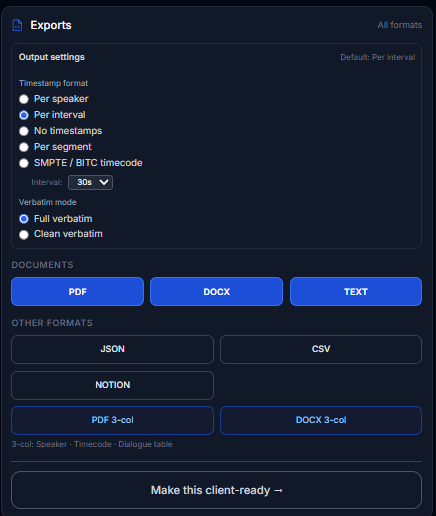
Exports panel — per-speaker timestamps, SMPTE/BITC, full/clean verbatim, PDF/DOCX/TXT, 3-column Speaker · Timecode · Dialogue tables
Make this client-ready — one click into guideline formatting
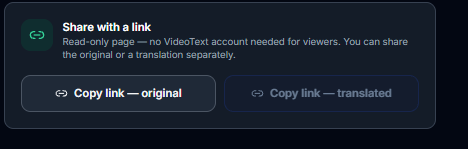
Share with a link — read-only review page for clients (original or translated, no account needed)


Speed: 60-minute video processes in 3 minutes — comparable to CapCut auto-captions, with **98.5% Whisper large-v3 accuracy** vs CapCut's ~88% on long-form speech.
CapCut vs VideoText.io: feature comparison
| Feature | CapCut | VideoText.io |
|---|---|---|
| Styled in-app caption overlays | ✅ Strong | ❌ Not the focus |
| Export SRT / VTT subtitle file | ❌ | ✅ |
| Upload SRT to YouTube / Vimeo | ❌ | ✅ |
| Whisper large-v3 accuracy (~98.5%) | ⚠️ ~88% on long/technical speech | ✅ |
| Translate subtitles (70+ languages) | ⚠️ In-app only, no file export | ✅ Timestamps preserved |
| Full plain-text transcript | ❌ | ✅ |
| Auto chapters + AI summary | ❌ | ✅ |
| Speaker labels | ⚠️ Limited | ✅ |
| Burn captions into video | ✅ | ✅ |
| Zero data retention | ❌ | ✅ |
| Free tier (no credit card) | ✅ | ✅ 3 uploads/day |
| Pro pricing | $9.99/mo | $7.99/mo flat |
Deep comparison: CapCut captions to SRT →
Who should switch from CapCut (and who shouldn't)
Switch to VideoText.io if you:
Publish the same content to YouTube + TikTok + LinkedIn and need one accurate SRT
Deliver client subtitle files, not just burned-in social clips
Hit CapCut accuracy walls on accents, jargon, or podcast-length speech
Need translation as downloadable SRT, not a re-rendered video
Want subtitle repair and validation before upload
Keep CapCut if you:
Only post vertical short-form with styled motion captions inside CapCut
Never need an external subtitle file
Never upload to platforms that require SRT/VTT sidecars
Best hybrid stack (what high-volume creators run): CapCut for TikTok styling → VideoText.io for SRT, YouTube, translation, and archival transcript.
CapCut alternative workflow (step-by-step)
Upload to Video → Subtitles → — pick SRT or VTT
Translate if needed → — same timestamps
Burn in for platforms that require it → OR upload SRT to YouTube
YouTube-specific: YouTube transcript generator →
FAQ: CapCut alternative
What is the best CapCut alternative for SRT export? VideoText.io — built for downloadable SRT/VTT, not locked overlays. Free tier: 3 uploads/day.
Can I get an SRT file from CapCut? No. Export video without captions, then upload to VideoText.io for a proper SRT in 2–5 minutes.
Is VideoText.io more accurate than CapCut auto-captions? Yes on long-form and technical speech — Whisper large-v3 (98.5%) vs CapCut's social-optimized model (88% in side-by-side tests).
Does VideoText.io burn captions like CapCut? Yes — Burn Subtitles embeds captions permanently when platforms require it.
CapCut alternative for YouTube creators? VideoText.io — paste URL or upload file, export SRT, upload to YouTube Studio. See transcription tool for YouTube →.
Is VideoText.io cheaper than CapCut Pro? Yes — VideoText Pro is $7.99/mo vs CapCut Pro $9.99/mo, and VideoText includes SRT export, speaker mapping, chapters, and translation CapCut cannot deliver as files.
CapCut alternative with speaker labels? VideoText.io — enable diarization, map names in "Who said what", export per-speaker timestamps or 3-column DOCX.
Start here
Generate SRT from your CapCut export → · CapCut vs VideoText landing page → · Generate SRT guide →
Related: Best transcription tools 2026 → · TurboScribe alternative → · YouTube URL to transcript →
Independent analysis based on publicly available product features. No affiliate relationships involved.
Comments
Join the discussionNo comments yet. Be the first to comment.