

Express Scribe Alternative: AI Transcription + Pedal-Ready Timestamps (2026)
Best Express Scribe alternative for transcriptionists who want AI-first speed without losing SMPTE timestamps, speaker labels, or client style guides. Before/after time math vs manual pedal workflows.
Express Scribe alternative searches come from transcriptionists stuck in the pedal + manual typing loop — accurate, but capped at 3–4× real-time on clear audio. AI tools promise 10× speed; most break timestamps, BITC, or client formatting that Express Scribe users depend on.
Replace typing, keep pro timestamps: Video → Transcript (free) → — Whisper draft + SMPTE/BITC mode + client guideline formatting. Compare transcription tools →
Quick answer: best Express Scribe alternatives in 2026
| Tool | Best for | vs Express Scribe |
|---|---|---|
| VideoText.io | AI draft + SRT/BITC + client style presets | Full pipeline; not a pedal player |
| Express Scribe | Foot-pedal manual transcription | Keep for pure manual jobs |
| TurboScribe | Cheap unlimited AI text | No BITC/SMPTE; no guideline export |
| Rev / GoTranscript | Human-reviewed marketplace jobs | Slow; per-minute cost |
| Descript | Video editing by transcript | Overkill for text-only deliverables |
Verdict: Express Scribe alternative for AI speed + pro deliverables = VideoText.io. Express Scribe alternative for manual legal/medical at 1× speed = keep Express Scribe + pedal.
Why transcriptionists search for an Express Scribe alternative
Express Scribe (NCH Software) is the industry-standard transcription player — foot pedal, variable speed, file encryption, time-stamped inserts. It was never built to generate transcripts. Every minute of text is typed or pasted from elsewhere.
Pain points that trigger Express Scribe alternative searches:
Speed ceiling — even fast typists hit 3–4× RT on clear audio; noisy files drop to 2×
BITC drift on long files — burned-in timecode can diverge hours into a 29.97fps master (see BITC timecode guide →)
Multi-tool handoffs — AI tool → Word → Express Scribe → client template = timestamp corruption
No AI in the loop — Express Scribe Pro adds speech recognition, but accuracy and export depth lag dedicated AI stacks
Marketplace formatting — Rev, GoTranscript, Scribie rules applied manually after every job
VideoText.io targets the gap: AI-first draft with deterministic SMPTE/BITC and guideline-format presets — without abandoning the timestamp discipline Express Scribe trained you on.
Before vs after: 60-minute interview (freelance job)
Typical Rev-style clean-verbatim job, single speaker, 60-minute WAV, client requires speaker tags + periodic timestamps.
Before (Express Scribe manual workflow)
| Step | Time |
|---|---|
| Load file, set speed, pedal through full audio | 90–120 min (1.5–2× RT typing) |
| Insert/fix timestamps at speaker turns | 12 min |
| Apply client style (numbers, fillers, tags) in Word | 18 min |
| QA pass + audio spot-checks | 15 min |
| Export + rename for platform | 5 min |
| Total | 140–170 min |
Effective rate on a \(0.50/min job (\)30): $10.50–$12.85/hour before platform fees.
After (VideoText.io + guideline formatting)
| Step | Time |
|---|---|
| Upload 60-min file → Whisper large-v3 draft | 3 min processing |
| Enable speaker diarization + timestamp mode | 1 min setup |
| Edit proper nouns + 5–8 mis-hears in transcript view | 12 min |
| Apply Rev / GoTranscript preset → | 4 min |
| QA pass (focus on glossary + edge speakers) | 8 min |
| Export DOCX/TXT with timestamps | 2 min |
| Total | 30 min |
Effective rate on same $30 job: $60/hour — same client deliverable, 4–5× less wall-clock time.
Note: Human-only jobs (heavy crosstalk, overlapping speakers, strict legal certification) may still need Express Scribe or Rev human review. AI + QA is the sweet spot for standard marketplace work.
Express Scribe vs VideoText.io: comparison
| Feature | Express Scribe | VideoText.io |
|---|---|---|
| Foot-pedal playback | ✅ Core feature | ❌ |
| AI transcription (Whisper-class) | ⚠️ Basic add-on | ✅ Whisper large-v3 |
| SMPTE / BITC timecode (29.97 DF) | ⚠️ Drift reported on long files | ✅ Deterministic integer-frame math |
| Speaker diarization | ❌ | ✅ |
| SRT / VTT export | ❌ | ✅ |
| Client style guide presets | ❌ Manual | ✅ Guideline format |
| Batch queue (podcast backlog) | ⚠️ One file at a time | ✅ Batch process |
| Zero data retention | ❌ | ✅ |
| Free tier | ⚠️ Limited | ✅ 3 uploads/day |
| Pro pricing | ~$40–80 (player + optional AI) | $7.99/mo flat |
| Speaker name mapping UI | ❌ Manual tags | ✅ "Who said what" + diarization |
| 3-column export (Speaker · Timecode · Dialogue) | ❌ | ✅ PDF/DOCX |
| Share read-only with client | ❌ | ✅ Original + translated links |
BITC deep dive: BITC timecode transcription workflow →
Pricing: Express Scribe stack vs VideoText.io
Express Scribe pricing looks like a one-time player license — until you add typing time, AI add-ons, and Word formatting.
| Express Scribe stack | VideoText.io | |
|---|---|---|
| Software cost | $40–80 (player) + optional AI | Free → $7.99/mo Pro |
| AI transcription | Add-on / separate tool | ✅ Whisper large-v3 included |
| BITC / SMPTE export | ⚠️ Manual; drift on long DF files | ✅ Deterministic, included |
| Speaker mapping | ❌ You type every tag | ✅ Diarization + name speakers |
| Client guideline export | ❌ Manual in Word | ✅ Guideline format |
| Effective $/hour (60-min Rev job) | $10–13/hr wall-clock | $60/hr with same deliverable |
Why VideoText.io wins on cost efficiency
No per-minute billing — Rev AI at \(0.25/min = \)15 per 60-min file; VideoText Pro = $7.99/mo flat for continued processing
One tool replaces 3–4 — Express Scribe + TurboScribe + Word + timestamp scripts → single upload
Fast processing — 60-min file in ~3 min; you spend time on QA, not typing
Full workflow: speaker mapping + BITC exports
Professional deliverables need more than raw text. VideoText.io includes:
1. Speaker diarization + mapping — enable speaker labels before transcribing; open "Who said what" to assign real names; tap any line to seek audio.
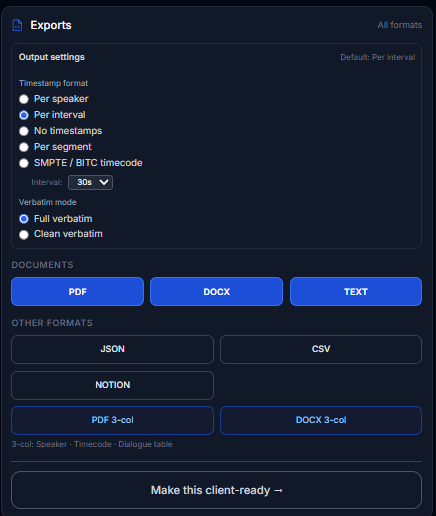
2. Export formats transcriptionists actually deliver:
Per-speaker timestamps
SMPTE / BITC timecode (29.97 DF, 25fps, etc.)
Full verbatim vs clean verbatim
3-column PDF/DOCX — Speaker · Timecode · Dialogue table
JSON, CSV, Notion
3. Make this client-ready → applies Rev / GoTranscript / Scribie presets in one pass.
4. Share with a link — send read-only original or translated transcript to client QA without an account.


Hybrid stack pros actually use
You do not have to uninstall Express Scribe.
| Job type | Tool |
|---|---|
| Clear interview, marketplace template | VideoText.io → guideline format → deliver |
| Overlapping speakers, court-certified | Express Scribe manual or Rev human |
| Long-form with burned-in timecode | VideoText.io SMPTE/BITC mode |
| Final audio QA spot-check | Express Scribe pedal at 1.2× |
Open Video → Transcript → for the draft. Keep Express Scribe for the 10% of files AI cannot touch.
Who should switch (and who should stay)
Switch to VideoText.io if you:
Process 20+ hours/week and your bottleneck is typing speed
Deliver Rev / GoTranscript / Scribie formatted files repeatedly
Need BITC-accurate timestamps without hand-typing every tag
Want one export (TXT, DOCX, SRT) instead of Word reformatting
Stay on Express Scribe if you:
Transcribe certified legal/medical where AI is prohibited
Work entirely manual at client request
Only need a player — you already have perfect text from another source
FAQ: Express Scribe alternative
What is the best Express Scribe alternative with AI? VideoText.io — AI draft plus pro timestamp modes and client guideline presets. TurboScribe is cheaper but lacks BITC and style-guide exports.
Does VideoText.io support foot pedals? No — it replaces the typing step, not playback control. Many users keep Express Scribe for final audio QA only.
Can VideoText.io match Express Scribe BITC timestamps? Yes — enable SMPTE/BITC mode with your anchor timecode and frame rate. See BITC workflow post →.
Express Scribe alternative for Rev freelancers? VideoText.io + guideline format + transcript cleanup guide →.
Is AI accurate enough to replace manual Express Scribe typing? For standard interviews and podcasts, yes with a 10–15 min QA pass. For overlapping speech or compliance jobs, use human review.
Start here
Enable SMPTE/BITC if your master has burned-in timecode
Try VideoText.io free → · Earn more per hour guide → · **Manual timestamp waste →
Related: Rev alternative → · Professional transcript cleanup → · What is transcript QA →
Independent analysis based on publicly available product features. No affiliate relationships involved.
Comments
Join the discussionNo comments yet. Be the first to comment.